_



If you are a CARAT+ Combo user and you have included the add-on for adding companies, the following are the steps in adding a company:-
Manage Additional Companies
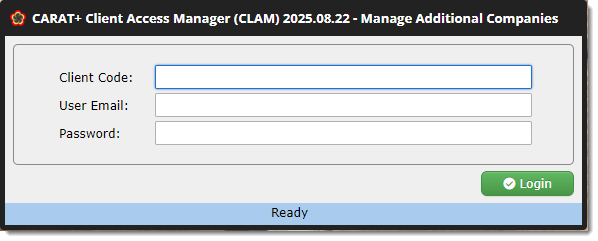
Once you click on the menu for managing additional companies, the following login web page will be displayed.
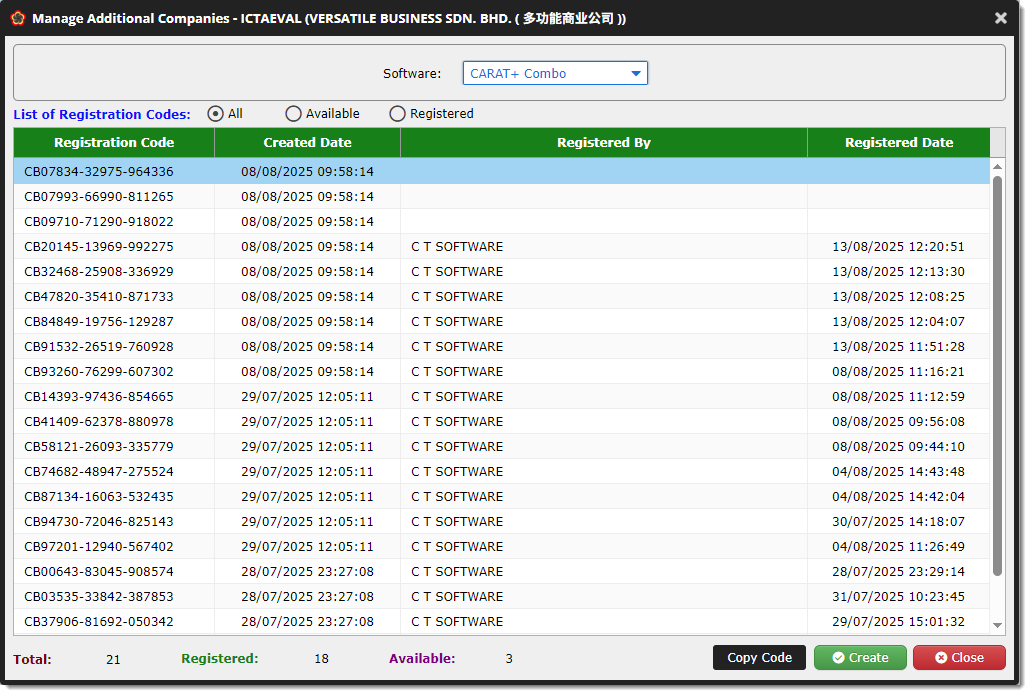
The following describes the various functions available:-
Registering An Account (For NEWCOs)
Click here for information on how to do it. Registration is required before you can access your program.
Important: After you receive your software licence, please refer to your sponsor for technical support.
Frequently Asked Questions (FAQ)
✱ Can I add companies that are not related to my company?
Yes, you can. There are no restrictions to the companies or individuals you can add.
✱ Are additional companies required to be installed in or run from my computer?
No. Additional companies can be installed in or run from any computer.
✱ Are there limitations to the programs provided to NEWCO?
No. The programs have the same functionality as the sponsor's.
✱ Can I charge NEWCO for provision of the software licences and support services?
Yes, you may charge for software licences of additional companies but you may not charge for support services as this is provided by CTS.
✱ Why does the NEWCO's registered company ID start with RC followed by 6 digits?
These special company IDs tell us that they are additional companies but without a SSP. If you purchase a SSP, your company ID will be changed to follow the initials of your company name. For example, if your company name is ABC Sdn. Bhd., your company ID could be ABCSB.
✱ What happens If the NEWCO does not renew their SSP after the first year of use?
After NEWCO registers their code, they get a complimentary SSP for 1 year with technical support provided by you.
Once the SSP expires and the NEWCO does not renew it, their program will go into maintenance mode. At this stage, they will not be able to create, add, add from, restore data files or import data. However, modules to change and delete data and print reports are still accessible. If the SSP is still inactive after 12 months, the NEWCO will not be able to log into their program.